Web-Based Products
1. CMS(Content Management System)
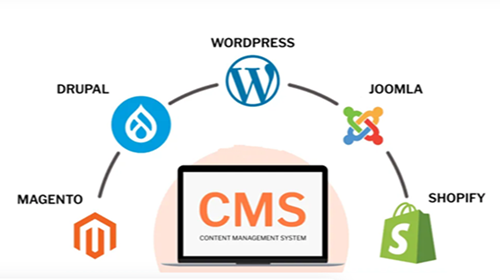
A Content Management System (CMS) is a software application that allows users to build, manage, and modify website content without needing to write code. A CMS provides a structured way to create web pages, upload media, and optimize content for search engines, making it ideal for bloggers, business owners, and eCommerce entrepreneurs.
Why Do You Need a CMS?
Before CMS platforms existed, websites were built manually using HTML, CSS, and JavaScript. This required technical skills and extensive development time. A CMS simplifies the process by offering ready-made templates, drag-and-drop editors, and automation tools, making website creation accessible to everyone.
How Does a CMS Work?
A CMS has two core components:
1. Content Management Application (CMA): The user-friendly interface where content is created and edited.
2. Content Delivery Application (CDA): The backend system that stores, manages, and delivers content to the website visitors.
Using a CMS, you can publish blog posts, add product listings, and modify site design—all without touching a single line of code.
Examples of Popular CMS Platforms
Here are some widely used CMS platforms:
- WordPress (Best Overall CMS)
- Powers over 40% of websites globally.
- Offers thousands of themes and plugins.
- Suitable for blogs, small businesses, and online stores.
- Wix (Best for Beginners)
- Features an intuitive drag-and-drop website builder.
- Ideal for personal portfolios and small businesses.
- Shopify (Best for eCommerce)
- Designed for online stores with built-in payment processing.
- Provides inventory management and marketing tools.
- Joomla (Best for Advanced Users)
- More flexible than WordPress but requires technical knowledge.
- Ideal for complex websites and membership platforms.
- Drupal (Best for Enterprise Websites)
- Known for security, customization, and scalability.
- Used by government agencies and large corporations.
For beginners, the best CMS platforms are WordPress, Wix, and Shopify due to their ease of use and extensive support.
2. LMS (Learning Management System)?
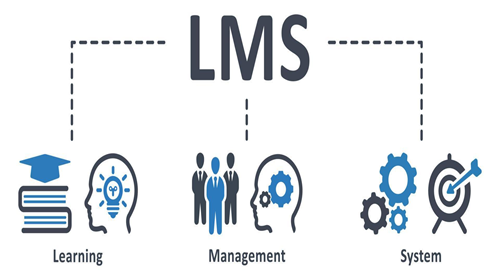
An LMS is a software application designed to manage, deliver, and track educational courses, training programs, or Learning and Development programs. It acts as a centralized hub for all educational activities, making it easier for educators, administrators, and learners to access and manage learning content.
Why Do You Need a LMS?
An LMS is a vital bridge between learners and instructors by tracking learner progress and delivering digital content. An LMS streamlines the distribution and tracking of learning materials, making it easier to handle many learners, especially in corporate settings.Organizations need LMS for several reasons, including the ability to centralize training content, track employee skills development, and provide a flexible learning environment. LMS platforms offer features such as personalized learning experiences, advanced analytics, and integration with other business systems, making them essential for modern training and development needs.
LMS platforms are versatile tools used across various sectors for multiple purposes:
Corporate Training
Companies use LMSs to train employees, ensuring they are up-to-date with the latest skills, compliance requirements, and industry standards. This includes onboarding new employees, continuous professional development, and specialized training programs.
Academic Education
Schools, colleges, and universities use LMSs to deliver online courses, manage classroom learning, and provide supplemental resources. This allows for a blended learning approach, combining traditional classroom methods with online activities.
Professional Certification
Organizations and educational institutions offer certification programs through LMSs, allowing learners to gain certifications that can enhance their career prospects.
Customer Training
Companies use LMSs to educate customers about their products and services, ensuring they can use them effectively and efficiently.
How Does a LMS Work?
LMS platforms provide a digital environment where learning materials can be uploaded, accessed, and interacted with. Here's a breakdown of how they function:
- Content delivery
Educators and trainers can upload various types of learning materials, such as videos, documents, presentations, and quizzes. These materials are organized into courses or modules that learners can access. - User management
Administrators can enroll learners into specific courses, assign roles (e.g., student, instructor), and manage user profiles. - Assessment and evaluation
LMS platforms offer tools for creating and administering quizzes, tests, and assignments. They also provide grading and feedback mechanisms to evaluate learner performance. - Tracking and reporting
One of the most powerful features of an LMS is its ability to track learner progress and generate detailed reports. This helps administrators and educators understand how learners are performing and identify areas for improvement.
Examples of Popular CMS Platforms
- TalentLMS
A cloud-based LMS ideal for companies of all sizes.
Key Features: User-friendly interface, built-in certifications, gamified lessons, and mobile access. It is particularly suitable for small businesses due to its free tier for teams with fewer than five users. - Moodle
An open-source LMS widely used in educational institutions.
Key Features: Highly customizable, supports various learning methods, and is suitable for both K-12 and higher education. It also addresses corporate training needs like onboarding and compliance. - Blackboard Learn
A comprehensive LMS designed for higher education and training providers.
Key Features: Offers structured governance, accessibility features, and is suitable for universities and organizations needing a robust learning management solution. - Docebo
An LMS focused on corporate training and development.
Key Features: Supports partner, customer, and employee training, with a strong emphasis on user engagement and analytics. - Google Classroom
A free tool for educators to create and manage classes online.
Key Features: Simplifies the process of assigning work, providing feedback, and fostering communication between teachers and students.
Web Security Solutions
Web Security Solutions protect websites from hacking, data theft, maklware, and cyber attacks.
Why do we use it?
- Protect user data
- Prevent unauthorized access
- Secure payments and logins
How does it work?
- Uses firewalls, encryption, authentication
- Monitors traffic
- Blocks suspicious activity
Examples
- SSL Certificates
- Cloudflare
- Web Application Firewall(WAF)
Ecommerce Platforms
An E-commerece platform is a website that allows users to buy and sell products or services online.
Why do we use it?
- Online Business
- 24/7 sales
- Reach global customers
How does it work?
- User selects products
- Adds to cart
- Pays via online payment gateway
- Order is processed and delivered
Example
- Amazon
- Flipkart
- Shopify
Corporate Websites
A corporate website represents a company's brand, services, and information online.
Why do we use it?
- Build trust
- Provide company information
- Attract clients and partners
How does it work?
- Static or dynamic pages
- Content managed by admin
- Displays services, about us, contact details
Example
- IT company websites
- Bank official websites
Booking Systems
A booking system allows users to reserve services or appointments online
Why do we use it?
- Saves time
- Avoids manual booking
- Real-time availability
How does it work?
- User selects date/time
- System checks availability
- Booking is confirmed and stored in database
Example
- Hotel booking websites
- Doctor appointment systems
- Movie ticket booking
Web Dashboards
A web dashboard visually displays data, reports and analytics in one place.
Why do we use it?
- Quick decision-making
- Monitor performance
- Visual representation of data
How does it work?
- Fetches data from database/APIs
- Displays charts, graphs, tables
- Updates in real time
Example
- Admin dashboards
- Sales analytics dashboards
- Power BI web dashboards
Web Portals
A web portal is a centralized platform that provides access to multiple services and information.
Why do we use it?
- Single login for mutliple services
- Personalized user experience
- Information management
How does it work?
- User selects date/time
- System checks availability
- Booking is confirmed and stored in database
Example
- Government portals
- Employee portals
- Student portals